Showing posts with label Scrap Candy. Show all posts
Showing posts with label Scrap Candy. Show all posts
Friday, 27 March 2015
**** New CT Timeline Set for ChocUkDesigns - Be Mine ****
I made this set using ChocUkDesigns Scrap Kit, Be Mine.
This Kit has an awesome 125 Elements & 17 Papers.
I paired it with the awesome Tube, Abby by Swan Scraps.
This tube is Multi-Layered so will work with any Kits.
Please DO NOT save this Set. It was made for the Kit Designer Only.


Friday, 6 February 2015
**** New CT Timeline Set - Clockwork Girl ****
For this Set I have used the Kit, Clockwork Girl by Michelle's Myths.
This Kit can be Purchased HERE.
Please do NOT save this set. It was made for the Kit Designer Only.


**** Timeline Set made with Michelle's Myths Just a Cowgirl Kit ****
This set is snaggable but is for PU ONLY. You must NOT add anything to this, that includes names.


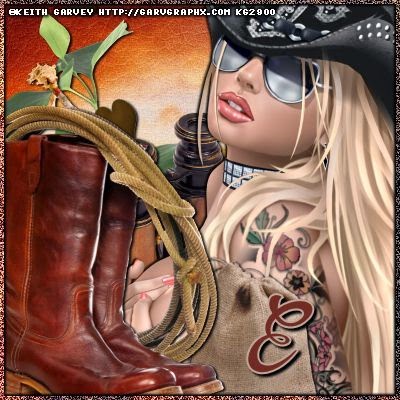


**** Just a Cowgirl by Michelle's Myths Timeline Set ****
I made this Timeline Set using the Awesome Kit, Just A Cowgirl by Michelle's Myths.
This Kit can be Purchased HERE.
Please do NOT save this set. It was made for the Kit Designer Only.


**** New Tag & Snags - Steampunk Romance - Michelle's Myths ****
I have made this tag & snags using Michelle's Myths Kit, Steampunk Romance.
This Kit can be purchased HERE.
The snags are for PU ONLY. Do NOT add any names or elements to them.

Tag made for the Kit Designer.
Now for the FTU Snags.


Tuesday, 27 January 2015
**** New CT Timeline Set & Tag for Smiley Creations Shop - Irish Princess Designs - Plum Passion ****
For this set I have used the gorgeous Kit, Plum Passion by Irish Princess Designs.
This Kit can be purchased HERE.
I have paired it with the stunning Tube, Lovely Babe by Arthur Crowe.
You need a License to use this Tube & it can be purchased HERE.
Please DO NOT save this set. It was made for the Kit Designer Only.


Tuesday, 23 September 2014
**** New CT Tutorial for Scrap Candy Store - Rieneke Designs - Spooky Nights ****

Now for the Tutorial
This tutorial is written with the assumption that you have working knowledge of PSP.
It was written by Dance In The Rain on 23rd September 2014 & is intended for educational purposes only.
Supplies:
Scrap Kit: Spooky Nights by Rieneke Designs found HERE
Tube: Love Goth by Arthur Crowe found HERE
Font of Choice - I used Gothicum
Mask: Number 41 By Millie's PSP Madness found HERE
♥ Lets get started ♥
For the Drop Shadow on everything except the tube I am using the following settings:
Vertical: 1
Horizontal: 2
Opacity: 100
Blur: 3.00
Color: Black (You can use any color you wish)
Remember to save everything as you go along in order not to lose it in case of a crash.
DNR means Do Not Resize.
C&P means Copy & Paste.
DS means Drop Shadow.
I am using the following elements frames & Papers:
* Paper 12 - DNR
* Element 13 - Resized to 125%
* Element 19 - DNR
* Element 31 - DNR
* Element 30 - Resized to 50%
* Element 64 - DNR
* Element 71 - DNR
* Element 70 - Resized to 50%
You can look back at my image for placement of elements.
Open Paper 12 (DNR)
Open Mask in a different window (DNR)
Click on Paper 12 window and go to Layers, New Layer Group, Click ok.
Click on Layers again & New Mask Layer, From Image.
In the source window click on the Mask Layer. Click ok.
C&P Element 13 on to your mask layer.
Resize to 125%. Apply Drop Shadow & Position.
C&P Element 19 on to your image.
DNR. Position. Apply Drop Shadow.
C&P Element 31 on to your image.
DNR. Position & apply Drop Shadow.
C&P Element 30 on to your image.
Resize to 50% and position. Apply Drop Shadow.
C&P Element 64 on to your image.
DNR. Position & apply Drop Shadow.
C&P Element 71 on to your image.
DNR. Position & apply Drop Shadow.
C&P Element 70 on to your image.
Resize to 50%. Position & apply Drop Shadow.
C&P your Tube on to your image.
Resize to 75%. Position & Apply Drop Shadow.
Use the following Drop Shadow Settings for the tube & name:
Vertical: 3
Horizontal: 3
Opacity: 100
Blur: 3.00
Color: Black (You can use any color you wish)
We are almost done now.
Add your name. I used font size 24 and color Black with an outline color White
I have also applied a Drop Shadow using the TUBE settings.
Add your copyright info, License number & Merge Visible.
Save & you're done. Simply & Easy.
I would love to see what you make using my tutorial.
Thank you for following my Tutorial & I hope you enjoyed it.
If you have any questions please feel free to email me at danceintherain1990@gmail.com
It was written by Dance In The Rain on 23rd September 2014 & is intended for educational purposes only.
Supplies:
Scrap Kit: Spooky Nights by Rieneke Designs found HERE
Tube: Love Goth by Arthur Crowe found HERE
Font of Choice - I used Gothicum
Mask: Number 41 By Millie's PSP Madness found HERE
♥ Lets get started ♥
For the Drop Shadow on everything except the tube I am using the following settings:
Vertical: 1
Horizontal: 2
Opacity: 100
Blur: 3.00
Color: Black (You can use any color you wish)
Remember to save everything as you go along in order not to lose it in case of a crash.
DNR means Do Not Resize.
C&P means Copy & Paste.
DS means Drop Shadow.
I am using the following elements frames & Papers:
* Paper 12 - DNR
* Element 13 - Resized to 125%
* Element 19 - DNR
* Element 31 - DNR
* Element 30 - Resized to 50%
* Element 64 - DNR
* Element 71 - DNR
* Element 70 - Resized to 50%
You can look back at my image for placement of elements.
Open Paper 12 (DNR)
Open Mask in a different window (DNR)
Click on Paper 12 window and go to Layers, New Layer Group, Click ok.
Click on Layers again & New Mask Layer, From Image.
In the source window click on the Mask Layer. Click ok.
C&P Element 13 on to your mask layer.
Resize to 125%. Apply Drop Shadow & Position.
C&P Element 19 on to your image.
DNR. Position. Apply Drop Shadow.
C&P Element 31 on to your image.
DNR. Position & apply Drop Shadow.
C&P Element 30 on to your image.
Resize to 50% and position. Apply Drop Shadow.
C&P Element 64 on to your image.
DNR. Position & apply Drop Shadow.
C&P Element 71 on to your image.
DNR. Position & apply Drop Shadow.
C&P Element 70 on to your image.
Resize to 50%. Position & apply Drop Shadow.
C&P your Tube on to your image.
Resize to 75%. Position & Apply Drop Shadow.
Use the following Drop Shadow Settings for the tube & name:
Vertical: 3
Horizontal: 3
Opacity: 100
Blur: 3.00
Color: Black (You can use any color you wish)
We are almost done now.
Add your name. I used font size 24 and color Black with an outline color White
I have also applied a Drop Shadow using the TUBE settings.
Add your copyright info, License number & Merge Visible.
Save & you're done. Simply & Easy.
I would love to see what you make using my tutorial.
Thank you for following my Tutorial & I hope you enjoyed it.
If you have any questions please feel free to email me at danceintherain1990@gmail.com
Subscribe to:
Posts
(Atom)